The short answer: For most applications, PostgreSQL with the pgvector extension is enough for vector search: it stores embeddings next to your existing data, supports approximate nearest-neighbour indexes (HNSW and IVFFlat), filters with ordinary SQL, and combines with Postgres full-text search for hybrid retrieval. Use HNSW indexes, store vectors as
halfvecwhen you need more than 2,000 indexed dimensions or want to halve storage, enable iterative index scans when you filter, and measure recall against exact search. Consider a dedicated vector database when vector search becomes the dominant workload at a scale or query rate your Postgres can't serve comfortably.
Somewhere in most AI projects, a diagram appears with a new box labelled "vector database." It's usually a separate service with its own SDK, its own billing, its own backup story and its own copy of data that already lives in your main database. Keeping the two in sync becomes a small project of its own, and every query that needs both a similarity search and a normal filter ("documents this user can see, published this year, most similar to the question") turns into application code that stitches two systems together.
For a lot of teams, that box is unnecessary. If you already run PostgreSQL, the pgvector extension adds vector types, distance operators and approximate nearest-neighbour indexes to the database you already have. Your embeddings sit in the same rows as the data they describe, filters are plain WHERE clauses, and transactions, backups and access control work the way they always have.
This guide is a practical tour: setting up pgvector, choosing an index, the dimension limits that catch people out, filtering correctly, hybrid search with full-text search, measuring recall, keeping storage under control, and an honest look at when you do need something bigger. The examples are plain SQL, so they apply whatever language your application is written in.
pgvector at a glance
pgvector is an open-source Postgres extension. It adds:
- Vector types:
vector(single precision),halfvec(half precision),bit(binary) andsparsevec(sparse vectors). - Distance operators:
<->for Euclidean (L2) distance,<=>for cosine distance,<#>for negative inner product and<+>for L1 distance, plus Hamming and Jaccard distance for binary vectors. - Indexes: HNSW and IVFFlat, both approximate nearest-neighbour (ANN) indexes that trade a little accuracy for a lot of speed.
It's available on most managed Postgres services, including Neon (which documents it here), and you can compile it yourself for Postgres 13 and later. Enabling it is one statement:
CREATE EXTENSION IF NOT EXISTS vector;Your first similarity search
Suppose you're building retrieval over documentation. Each chunk of text gets an embedding from your embedding model. Store the chunk, its embedding and the metadata you'll want to filter on in one table:
CREATE TABLE doc_chunks (
  id          bigserial PRIMARY KEY,
  document_id bigint NOT NULL REFERENCES documents(id) ON DELETE CASCADE,
  tenant_id   bigint NOT NULL,
  content     text   NOT NULL,
  embedding   vector(1536) NOT NULL,
  updated_at  timestamptz NOT NULL DEFAULT now()
);
A similarity search is an ORDER BY on a distance operator with a LIMIT:
SELECT id, content, embedding <=> $1 AS distance
FROM doc_chunks
WHERE tenant_id = $2
ORDER BY embedding <=> $1
LIMIT 5;
Here $1 is the query's embedding, passed as a parameter. Use the distance your embedding model was designed for; for most text embedding models that's cosine distance (<=>). If your embeddings are normalised to unit length, inner product (<#>) gives the same ranking and is slightly faster to compute. Note that <#> returns the negative inner product, so smaller still means more similar.
Without an index, this query is exact: Postgres compares the query vector with every row. That's perfectly fine for tens of thousands of rows and is the gold standard for accuracy. Beyond that, you'll want an index.
Choosing an index: HNSW or IVFFlat
Both index types find approximate nearest neighbours, meaning they usually, but not always, return the true closest vectors. The fraction of true neighbours you get back is called recall, and tuning is mostly about trading recall against speed.
| HNSW | IVFFlat | |
|---|---|---|
| How it works | A multi-layer graph of vectors connected to their neighbours | Vectors grouped into lists around centroids; searches a few lists |
| Query speed vs recall | Generally better | Good, more sensitive to tuning |
| Build time and memory | Slower build, more memory | Faster build, less memory |
| Needs data before creating? | No: can be created on an empty table | Yes: create after loading representative data |
| Main query-time knob | hnsw.ef_search (default 40) | ivfflat.probes (default 1) |
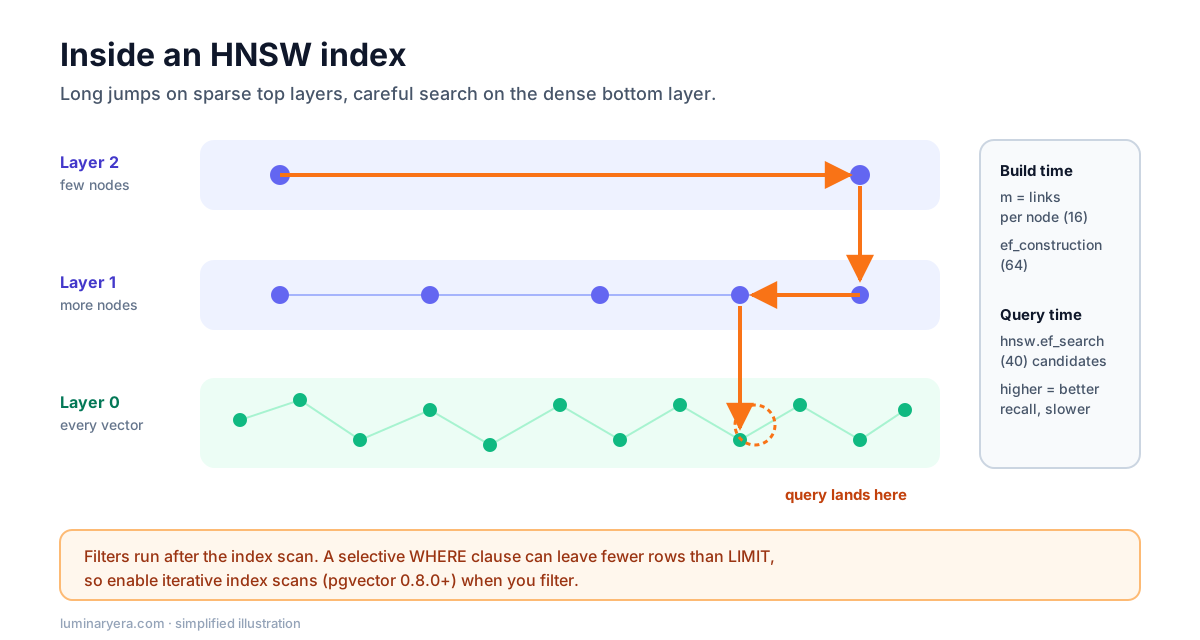
For most applications, HNSW is the better default: it handles inserts gracefully, doesn't need training data, and gives a better speed-to-recall trade-off. IVFFlat is worth considering when build time or memory is the bottleneck.
-- HNSW with cosine distance; m and ef_construction shown at their defaults
CREATE INDEX ON doc_chunks USING hnsw (embedding vector_cosine_ops)
  WITH (m = 16, ef_construction = 64);
The operator class must match the operator in your queries: vector_cosine_ops for <=>, vector_l2_ops for <->, vector_ip_ops for <#>. If they don't match, Postgres silently ignores the index and does an exact scan, which is a classic "why is this slow?" bug.
Tuning HNSW
Three settings matter:
m(default 16): the number of connections per node. Higher values improve recall on large or difficult datasets at the cost of memory and build time.ef_construction(default 64): how hard the build works to find good connections. Higher values improve recall and slow the build.hnsw.ef_search(default 40): how many candidates a query explores. This is the main runtime trade-off between recall and latency, and you can set it per transaction.
BEGIN;
SET LOCAL hnsw.ef_search = 100;  -- higher recall for this query only
SELECT id FROM doc_chunks ORDER BY embedding <=> $1 LIMIT 10;
COMMIT;
Building an HNSW index on a large table is much faster when the graph fits in maintenance_work_mem; pgvector prints a notice when it doesn't. Raise it for the session that builds the index, but not so high that you starve the server, and build large indexes outside peak hours or with CREATE INDEX CONCURRENTLY so writes aren't blocked.
The dimension limits that catch people out
This is the single most common surprise. A vector column can store up to 16,000 dimensions, but HNSW and IVFFlat indexes on vector support only up to 2,000 dimensions. Plenty of popular embedding models produce 1,536 dimensions, which fits. Some produce 3,072, which doesn't.
You have three options when your embeddings are too large to index:
- Use
halfvec. Half-precision vectors can be indexed up to 4,000 dimensions and take half the storage. For retrieval, the precision loss is usually negligible, but measure it on your data. - Request fewer dimensions. Several embedding APIs let you ask for shorter embeddings from the same model. Shorter vectors are cheaper to store and search, often with a modest quality cost.
- Index a reduced copy, rerank with the full vector. Index a smaller representation for the fast first pass, then reorder the top candidates using exact distance on the full vector.
You don't even need a separate column for the first option. pgvector supports expression indexes, so you can index a cast:
CREATE INDEX ON doc_chunks USING hnsw ((embedding::halfvec(3072)) halfvec_cosine_ops);

SELECT id FROM doc_chunks
ORDER BY embedding::halfvec(3072) <=> $1::halfvec(3072)
LIMIT 10;
For that to work, the column has to be vector(3072) and the query has to use exactly the same expression as the index.
Filtering without losing results
Almost every real query has a filter: this tenant, this language, documents the user can access, content updated recently. With approximate indexes there's a subtle trap. The index finds the nearest candidates first, and the filter is applied afterwards. If the filter matches only a small share of rows, most of the candidates get thrown away and you get back fewer results than you asked for.
The pgvector documentation gives a concrete example: with HNSW and the default ef_search of 40, a condition that matches 10% of rows leaves only about four rows on average. Ask for ten results and you might get four, with no error to tell you.
Since version 0.8.0, pgvector can fix this with iterative index scans, which keep scanning more of the index until enough rows pass the filter:
SET hnsw.iterative_scan = relaxed_order;  -- or strict_order to keep exact ordering

SELECT id, content FROM doc_chunks
WHERE tenant_id = $2
ORDER BY embedding <=> $1
LIMIT 10;
relaxed_order is faster but can return results slightly out of order, so re-sort the final rows if order matters. Other strategies still have their place: a B-tree index on the filter column lets Postgres choose an exact scan when the filter is very selective, and for multi-tenant systems with a few large tenants, partial indexes or partitioning per tenant can work well.
Whatever you do, put access control in the WHERE clause. Filtering by permissions in SQL is one of the strongest arguments for keeping vectors in Postgres: there's no second system to keep consistent, and the model never sees chunks the user isn't allowed to read. The guide on why RAG chatbots give bad answers explains why that matters.
Hybrid search: vectors plus full-text
Vector search is good at meaning and bad at exact tokens: error codes, product SKUs, function names and rare proper nouns. Keyword search is the opposite. Combining them, known as hybrid search, is one of the most reliable improvements to retrieval quality, and Postgres already has excellent full-text search built in.
Add a generated tsvector column with a GIN index, run both searches, and merge the rankings with Reciprocal Rank Fusion (RRF), which the pgvector documentation also recommends:
ALTER TABLE doc_chunks
  ADD COLUMN content_tsv tsvector
  GENERATED ALWAYS AS (to_tsvector('english', content)) STORED;
CREATE INDEX ON doc_chunks USING gin (content_tsv);

WITH semantic AS (
  SELECT id, row_number() OVER (ORDER BY embedding <=> $1) AS rank
  FROM doc_chunks
  WHERE tenant_id = $3
  ORDER BY embedding <=> $1
  LIMIT 50
),
keyword AS (
  SELECT id, row_number() OVER (ORDER BY ts_rank_cd(content_tsv, query) DESC) AS rank
  FROM doc_chunks, websearch_to_tsquery('english', $2) AS query
  WHERE tenant_id = $3 AND content_tsv @@ query
  ORDER BY ts_rank_cd(content_tsv, query) DESC
  LIMIT 50
)
SELECT id,
       coalesce(1.0 / (60 + semantic.rank), 0) + coalesce(1.0 / (60 + keyword.rank), 0) AS score
FROM semantic FULL OUTER JOIN keyword USING (id)
ORDER BY score DESC
LIMIT 10;
Here $1 is the query embedding and $2 is the raw query text. RRF doesn't care that cosine distance and text rank are on different scales, because it only uses each result's position in its list. The constant 60 is the conventional choice. For further gains, pass the fused top results through a reranking model before handing them to your LLM.
Measuring recall, not just speed
Approximate search can be fast and quietly wrong. The only way to know your recall is to measure it against exact search on your own data. It takes a few minutes:
- Take a sample of real queries, say a few hundred.
- For each, run the search with the index disabled to get the true top results:
SET enable_indexscan = off;in a transaction forces an exact scan. - Run the same queries normally, using the index.
- Recall@10 is the average share of the true top ten that the indexed query returned.
Then tune. If recall is lower than you'd like, raise hnsw.ef_search first, since it costs nothing at build time. If that isn't enough, rebuild with higher m or ef_construction. Record latency at each setting so you can choose a deliberate trade-off rather than a default.
Repeat the measurement whenever something important changes: a new embedding model, a large data import, a different filter pattern, or an upgrade of pgvector itself. Recall depends on the shape of your data, so numbers from a benchmark or from last year's dataset don't transfer reliably. Keeping the query sample and the measurement script in your repository turns this into a five-minute check instead of a research project, and gives you a baseline to compare against when someone reports that search "feels worse."
Keep index recall separate from end-to-end retrieval quality. Perfect ANN recall only means you found the vectors closest to the query embedding, which isn't the same as finding the passage that answers the question. That depends on chunking, embeddings and hybrid search, and it's measured with a labelled evaluation set as described in the guide on testing LLM features with evals.
Storage and memory: doing the arithmetic
Each vector takes 4 × dimensions + 8 bytes, according to the pgvector docs, so a 1,536-dimension embedding is about 6 KB. A million chunks is roughly 6 GB of vectors before the index, the text and the rest of the row. HNSW indexes add substantial size on top, and query performance is best when the index fits in memory.
Ways to keep this in check:
halfvechalves vector storage (2 × dimensions + 8bytes) and index size, usually with little retrieval quality loss.- Binary quantization reduces each dimension to a single bit. pgvector's
binary_quantizefunction plus an expression index onbitgives a very small, very fast first-pass index; rerank the top candidates with full-precision distance to recover accuracy. - Fewer, better chunks. Deduplicating boilerplate and not embedding navigation text, footers and repeated disclaimers often removes a surprising share of rows.
- Shorter embeddings where your provider supports them.
Also plan for re-embedding. When you switch embedding models, every vector must be regenerated, because vectors from different models aren't comparable. Store the model name and version alongside each embedding, and design migrations so you can fill a new column in the background and switch queries over when it's complete.
Keeping embeddings in sync with your data
Embeddings are derived data. Every time a document is created, edited or deleted, its chunks and embeddings have to follow, and the most common production bug in retrieval systems isn't a bad index. It's stale embeddings that no longer match the text users see.
Deletion is the easy part when vectors live in Postgres: a foreign key with ON DELETE CASCADE, as in the table above, removes a document's chunks in the same transaction as the document. That alone is a good reason to keep embeddings next to their source rows. With a separate vector service, the same guarantee needs a sync job, and every gap in that job is a window where deleted content can still be retrieved.
Updates need a little more design, because computing embeddings means calling a model, which is slow and can fail. A reliable pattern:
- Mark rows as needing embeddings. When a document changes, write its new chunks with a null embedding, or set a flag such as
needs_embedding = true, in the same transaction as the edit. - Process in the background. A worker picks up flagged rows in batches, calls the embedding API, and writes the vectors. Batching keeps API costs and rate limits under control.
- Make it idempotent and retryable. If the worker crashes halfway through, it should be able to run again without creating duplicates. Selecting rows with
FOR UPDATE SKIP LOCKEDlets several workers run in parallel without processing the same rows. - Exclude unready rows from search. Queries should filter out chunks whose embedding is still null, so half-processed documents never produce strange results.
Hash the chunk text and store the hash next to the embedding. When a document is edited, only chunks whose text actually changed need new embeddings, which saves a lot of API calls for large documents with small edits.
Finally, monitor the backlog: the number of rows waiting for embeddings and the age of the oldest one. A growing backlog means new content isn't searchable yet, and users will notice before your error rates do. The same idea of watching the pipeline, not just the endpoint, is covered in the guide to LLM observability.
Operational habits that save trouble
- Embed outside the transaction. Calling an embedding API inside a database transaction holds locks while you wait on the network. Compute embeddings first, then write.
- Batch inserts. Bulk-load with
COPYor multi-row inserts, and for very large initial loads consider creating the index after loading. - Vacuum. Frequent updates and deletes leave dead tuples that affect index scans and results. Make sure autovacuum keeps up on embedding tables.
- Watch the query plans. Use
EXPLAIN ANALYZEto confirm the index is used. Mismatched operator classes, casts that don't match the index expression, andORDER BYclauses the planner can't use with the index are the usual culprits. - Separate heavy workloads. If vector queries compete with transactional traffic, a read replica for search keeps your primary responsive.
Signs you need a dedicated vector database
pgvector isn't the answer to everything. A dedicated vector database is worth evaluating when:
- Vector search is the main workload, at a scale of vectors or queries per second that would require very large or many Postgres instances.
- You need features pgvector doesn't offer, such as particular quantization schemes, multi-vector retrieval or built-in distributed sharding for vectors.
- Your team doesn't run Postgres and would be adopting it only for vectors.
Even then, it's often best to start in Postgres, measure where you hit limits, and move the vector workload only when you have numbers showing it's needed. Migrating embeddings later is a well-understood job; running two systems you didn't need from day one is an ongoing cost.
The same logic applies to other memory-like features. If you're adding long-term memory to an assistant, the same pgvector table design works well for storing and retrieving memories, as described in the guide to AI agent memory.
Frequently asked questions
Is pgvector good enough for production?
For many applications, yes. pgvector supports approximate nearest-neighbour indexes (HNSW and IVFFlat), filtering with ordinary SQL, hybrid search with Postgres full-text search, and all of Postgres's transactions, backups and access control. Consider a dedicated vector database when vector search becomes the dominant workload at a scale or query rate that Postgres can't serve comfortably.
Should I use HNSW or IVFFlat in pgvector?
HNSW is the better default for most applications: it offers a better speed and recall trade-off, handles inserts well and can be created on an empty table. IVFFlat builds faster and uses less memory, but needs representative data before the index is created and is more sensitive to tuning.
What is the maximum vector dimension in pgvector?
A vector column can store up to 16,000 dimensions, but HNSW and IVFFlat indexes on the vector type support up to 2,000 dimensions. The halfvec type can be indexed up to 4,000 dimensions, which is a common solution for larger embeddings.
Why does my pgvector query return fewer results than the LIMIT?
With approximate indexes, filters are applied after the index scan, so a selective WHERE clause can discard most of the candidates. Since pgvector 0.8.0 you can enable iterative index scans, which keep scanning until enough rows match, or increase hnsw.ef_search.
How do I do hybrid search in PostgreSQL?
Add a tsvector column with a GIN index for full-text search, run a keyword search and a pgvector similarity search, and combine the two ranked lists with Reciprocal Rank Fusion. Optionally rerank the fused results with a cross-encoder before passing them to your model.
The takeaway
The best vector database for many teams is the database they already run. pgvector puts embeddings next to the data they describe, makes filtering and permissions ordinary SQL, and pairs naturally with full-text search for hybrid retrieval. Learn its few sharp edges (dimension limits, operator classes, filtering with approximate indexes) and measure recall instead of assuming it. Then you can add a dedicated system later if the numbers ever call for one, rather than because a diagram did.
Author at LuminaryEra
The LuminaryEra editorial desk publishes long-form, hands-on guides on AI-assisted development, large language models, developer tools and web engineering. Articles are researched and drafted with the help of AI tools, link to their sources, and are corrected when readers report errors.
View all articles