
The short answer: Design agent tools the way you'd design an API for a capable new colleague who can't ask questions. Build a few task-shaped tools rather than wrapping every endpoint. Give them unambiguous, namespaced names and descriptions that say when to use them, what the inputs mean, and what comes back. Use strict schemas with enums. Return compact, meaningful results and error messages that explain how to recover. Enforce permissions and safety in code, not in the description, and test the toolset on realistic multi-step tasks.
Here's a story that plays out in a lot of teams building their first agent.
Someone takes the company's internal REST API, which has forty endpoints, and turns each one into a tool. It feels thorough. The agent can now do anything the API can do. Then they give it a simple task: "Book a 30-minute meeting with Priya and Sam next week."
The agent calls list_users with no filter and receives two thousand user records. It reads them, finds a Priya, then calls list_users again for Sam because it lost track of the first result. It fetches both calendars for the whole month, at full detail, and now its context is mostly calendar JSON. It proposes a time that clashes with a meeting on Sam's calendar because it misread a timezone. When asked to try again, it calls get_user_by_id with a name instead of an ID, gets a bare 404, and gives up.
None of these failures is the model being stupid. Every one of them is a tool design problem. The model can only work with what the tools give it: their names, their descriptions, their input schemas, and the results they return. Design those badly and even the strongest model will flounder. Design them well and a surprisingly modest model can do reliable work.
This guide covers the principles that make the difference, with concrete examples you can apply to your own function definitions or MCP servers.
The mental model: an API for a colleague who can't ask questions
When a human developer uses an unfamiliar API, they read the docs, skim examples, try a call, look at the error, search for the answer, and maybe ask a colleague. An agent has a much thinner channel. It sees the tool's name, a description, and a schema, and it learns about the world only through what each call returns. It can't ask what a parameter means. It can't look at your source code. It interprets everything literally.
So the right mindset is to write tools for a smart, diligent new colleague on their first day, who has only the documentation in front of them. Anthropic's engineering team frames tools in a similar way in their guide on writing tools for agents, which recommends, among other things, choosing tools deliberately, namespacing them, returning meaningful context, optimizing responses for token efficiency, and prompt-engineering the descriptions. The principles below build on the same ideas.
There's one more framing that helps: tools are the agent's user interface. You wouldn't build a UI by exposing every database table as a screen. You'd design screens around what the user is trying to accomplish. Tools deserve the same thought.
Principle 1: design around tasks, not endpoints
The biggest single improvement most toolsets can make is to stop mirroring the API and start mirroring the work.
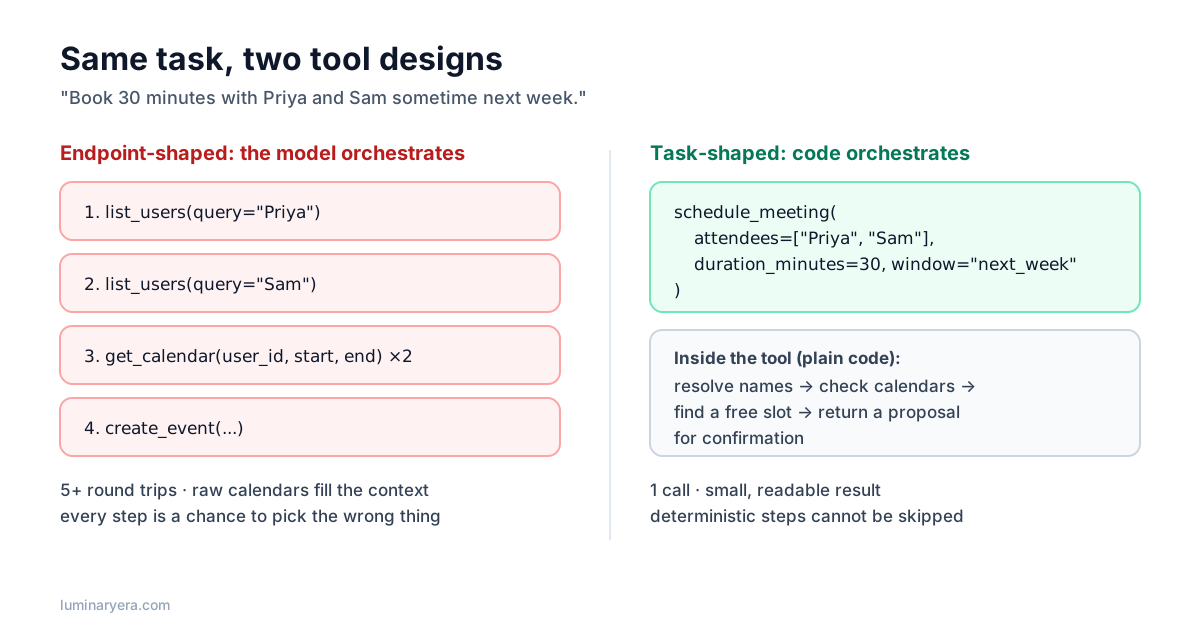
With endpoint-shaped tools, the model has to orchestrate a multi-step process itself: find the users, fetch their calendars, compute a free slot, create the event. Every step is a decision it can get wrong, and every intermediate result piles up in its context. With a task-shaped tool like schedule_meeting, the deterministic parts (resolving names, intersecting calendars, finding a slot) happen in ordinary code, which never forgets a step or misreads a timezone. The model does what it's good at: understanding the request and filling in the parameters.
Some signs that a group of tools should be combined:
- The agent almost always calls them in the same sequence.
- One tool's output is only ever used as input to another.
- The steps in between are deterministic, with no judgment needed.
- Agents frequently get the sequence wrong in your logs.
This doesn't mean every agent needs one giant tool. Keep tools separate when the agent genuinely needs to make a decision between steps, such as reviewing search results before choosing which document to open. The goal is to put decisions in the model and procedures in code.
Fewer tools also helps directly. Every tool definition costs tokens on every request, and a long list of overlapping tools makes selection harder. If two tools could plausibly handle the same request, the model will sometimes pick the wrong one. A small set of clearly distinct tools beats a large set of fuzzy ones.
Principle 2: names that can't be confused
Tool names do a lot of work. They're often the first thing the model uses to decide what's relevant. A few rules:
- Use verb-noun names that describe the action:
search_orders,refund_order,get_order_status. - Namespace by system or resource when an agent has tools from several services:
github_search_issuesandjira_search_issuesare unambiguous; two tools namedsearch_issuesfrom different servers are a coin flip. - Avoid near-synonyms. If you have
find_customerandlookup_customer, the model will wonder what the difference is, and so will the next engineer. Merge them or make the difference obvious in the name. - Be consistent. If one tool uses
customer_id, they all should. Don't make the model guess whetherclient_id,user_id, andaccount_idare the same thing.
Principle 3: descriptions are prompts
A tool description is not a docstring for humans. It's part of the prompt, and it has a direct effect on whether the agent uses the tool correctly. Most bad tool behavior can be traced to a description that was written in ten seconds.
A good description answers five questions: what does this tool do, when should it be used (and when not), what does each input mean and how should it be formatted, what comes back, and what side effects does it have.
Compare these two definitions for the same tool:
{
  "name": "search",
  "description": "Searches tickets.",
  "input_schema": {
    "type": "object",
    "properties": {
      "q": { "type": "string" },
      "s": { "type": "string" },
      "n": { "type": "integer" }
    }
  }
}
{
"name": "support_search_tickets",
"description": "Search customer support tickets by keyword. Use this to find past tickets about a problem or a customer before answering. Do not use it to look up a single ticket when you already have its ID; use support_get_ticket instead. Returns up to `limit` tickets, newest first, each with id, subject, status, customer name and a one-line summary. Read-only.",
"input_schema": {
"type": "object",
"properties": {
"query": {
"type": "string",
"description": "Keywords to match against ticket subject and body, e.g. 'double charge March'. Customer emails also work."
},
"status": {
"type": "string",
"enum": ["open", "pending", "closed", "any"],
"description": "Filter by ticket status. Use 'any' unless the user asks for a specific status."
},
"limit": {
"type": "integer",
"minimum": 1,
"maximum": 20,
"description": "Maximum number of tickets to return. Default to 5."
}
},
"required": ["query", "status", "limit"],
"additionalProperties": false
}
}The second one is longer, and that's the point. It tells the model which tool to prefer in a confusable case, what a good query looks like, what the default should be, and that it's safe to call because it doesn't change anything. Each of those sentences prevents a specific mistake you'd otherwise see in your logs.
A useful exercise: hand your tool definitions, and nothing else, to a colleague who has never seen the system, and ask them to describe when they'd use each tool. Wherever they hesitate, the model will too.
Principle 4: schemas that leave little room for error
The input schema is your chance to make wrong calls impossible rather than merely unlikely.
- Use enums for any parameter with a fixed set of values. Free-text fields invite creative spelling.
- Mark required fields and set bounds (minimum, maximum, length limits).
- Turn on strict schema enforcement if your provider supports it. Strict mode guarantees that the arguments the model produces validate against your schema, so you never receive a call with a missing field or a string where a number should be. Anthropic's API, for example, supports
strict: trueon tool definitions, and OpenAI offers strict function calling. Strict modes often requireadditionalProperties: falseand may restrict which JSON Schema features you can use, so check the documentation. - Make units and formats explicit.
duration_minutesis better thanduration. "ISO 8601 date, e.g. 2026-11-03" is better than "date". - Accept what the model naturally has. If the conversation contains names, let the tool accept a name and resolve it to an ID in code, returning a clear error if it's ambiguous. Forcing the model to obtain an opaque UUID first adds a call and a chance to mix IDs up.
Even with strict mode, validate inputs in your tool implementation. Strict mode guarantees types and required fields, not business rules like "the end date must be after the start date" or "this user can only see their own orders". The same layered approach I described for reliable structured output applies to tool arguments: the schema enforces the shape, your code enforces the rules.
Principle 5: return what the agent needs next
Tool results are where many agents quietly drown. Every token a tool returns sits in the context for the rest of the task and is paid for on every subsequent step. Raw API responses are usually full of fields the model doesn't need: internal IDs, timestamps in three formats, nested metadata, empty arrays.
Shape results for the agent:
- Return only relevant fields. For a list of tickets, the subject, status, customer and a summary are useful. The 40 other columns aren't.
- Include human-meaningful identifiers alongside technical ones. "Priya Sharma (id: u_8f3a)" lets the model reason about who's who; a bare UUID doesn't.
- Paginate and truncate, and say so. If there are 340 results, return the first 10 and a line like "Showing 10 of 340. Narrow the query or request the next page with page=2." The model can then decide whether it needs more.
- Offer a detail level. A
response_formatparameter with options like"concise"and"detailed"lets the agent ask for more only when it needs it. - Prefer readable structure. Compact JSON or simple text both work. What matters is that the important information is easy to find and isn't buried in noise.
This isn't only about cost, though it does have a big effect there; I covered that side in the guide to cutting LLM API costs. Agents make better decisions with less noise in their context. Trimming tool output often improves task success and reduces cost at the same time.
Principle 6: errors that teach the agent how to recover
When a human developer gets a 404, they go and investigate. When an agent gets a 404, it has nothing to work with. It might retry the same call, try something random, or give up. Error messages for agents should say what went wrong and what to do instead.
| Unhelpful | Helpful |
|---|---|
404 Not Found | No user named "Jon". Closest matches: "John Smith" (u_19), "Jonas Berg" (u_42). Call again with one of these names. |
400 Bad Request | end_date (2026-11-01) is before start_date (2026-11-03). end_date must be the same as or after start_date. |
Error | Calendar service timed out. This is temporary; retry once. If it fails again, tell the user scheduling is unavailable. |
403 | You don't have permission to refund orders over $500. Offer to escalate to a human agent instead. |
Most tool-use APIs let you mark a tool result as an error, so the model knows the call failed rather than treating the error text as data. Use that, and never silently drop a failed call: the model needs to see that something went wrong to adjust.
Also distinguish errors the agent can fix (wrong parameters, ambiguous names) from errors it can't (an outage, missing permissions). For the second kind, tell it plainly to stop and report, so it doesn't burn twenty retries.
Principle 7: put safety in code, not in descriptions
A tool description that says "only use this for refunds under $500" is a suggestion. A tool implementation that rejects refunds over $500 is a rule. When it matters, write the rule.
- Least privilege. Each tool should use credentials scoped to what it needs, ideally the permissions of the user the agent is acting for, not a powerful service account.
- Preview before commit. For destructive or outward-facing actions, have the tool return a preview ("This will email 1,240 customers. Confirm?") and require a separate confirmation step, ideally from a human.
- Idempotency. Agents retry. A
create_invoicetool that creates a duplicate every time the model retries after a timeout will eventually cause a real problem. Accept an idempotency key or detect duplicates. - Limits. Timeouts on every external call, caps on how many items one call can affect, and rate limits per session.
- Treat tool results as untrusted. Anything a tool fetches from the outside world (web pages, emails, tickets, documents) can contain instructions aimed at your agent. This is how indirect prompt injection works, and tool design is one of your main defenses. The guide on prompt injection covers this in depth.
Principle 8: handle slow and long-running work
Some operations take minutes: generating a report, running a test suite, processing a large file. Don't make a tool call block for that long. Return a job ID immediately along with an estimate, and provide a separate status tool. The agent can do other work, or tell the user it's waiting, instead of hanging until a timeout kills the whole task.
A before-and-after refactor
Here's what applying these principles looks like in code. Picture a support agent with six tools that wrap an order API one-to-one: get_customer, list_orders, get_order, get_shipment, create_refund, and send_email. This is a very common starting point, and it tends to fail in predictable ways: four or five calls to answer every "where is my order?" question, and the occasional refund on the wrong order because the agent mixed up two order IDs belonging to the same customer.
A redesign replaces the lookup chain with one task-shaped tool and makes the refund tool safe by construction:
import { z } from "zod";

// One call answers "where is my order?" end to end.
export const orderStatusTool = {
  name: "orders_get_status",
  description:
    "Get the current status of a customer's order, including shipping and tracking. " +
    "Use this for any question about where an order is or when it will arrive. " +
    "Identify the customer by email; if they have several recent orders and the user " +
    "hasn't said which, the result lists them so you can ask. Read-only.",
  input_schema: {
    type: "object",
    properties: {
      customer_email: { type: "string", description: "The customer's email address." },
      order_number: {
        type: ["string", "null"],
        description: "Order number like ORD-104233 if the user gave one, otherwise null.",
      },
    },
    required: ["customer_email", "order_number"],
    additionalProperties: false,
  },
  strict: true,
};

const RefundInput = z.object({
  order_number: z.string().regex(/^ORD-\d{6}$/),
  reason: z.enum(["damaged", "not_received", "wrong_item", "other"]),
  confirm: z.boolean(),
});

// Safety lives here, not in the description.
export async function refundOrder(raw: unknown, ctx: { userCanRefundUpTo: number }) {
  const input = RefundInput.parse(raw);
  const order = await orders.find(input.order_number);
  if (!order) {
    return { isError: true, content: `No order ${input.order_number}. Check the number with the customer.` };
  }
  if (order.total > ctx.userCanRefundUpTo) {
    return {
      isError: true,
      content: `Order total ${order.total} exceeds your refund limit. Offer to escalate to a supervisor.`,
    };
  }
  if (!input.confirm) {
    // First call returns a preview; nothing changes until confirm=true.
    return { content: `Preview: refund ${order.total} to ${order.customerName} for ${order.number}. Call again with confirm=true after the customer agrees.` };
  }
  await refunds.create({ orderId: order.id, reason: input.reason, idempotencyKey: order.id });
  return { content: `Refunded ${order.total} for ${order.number}. The customer will see it in 5 to 10 business days.` };
}
Look at what changes. "Where is my order?" becomes a single call. Refunding the wrong order gets much harder, because the tool takes a human-readable order number, validates it, and shows a preview before anything happens. And the refund limit no longer depends on the model reading a sentence carefully. The tool count goes down, and every remaining tool is easier to choose correctly.
Testing tools the way agents use them
Unit tests check that a tool's code works. They don't tell you whether an agent will use it correctly. For that, you need task-level evaluation:
- Write realistic tasks, ideally from real user requests, that need several steps: "Customer says they were charged twice for order 104233 and wants their money back."
- Run the agent on each task with your toolset and record the full transcript.
- Measure more than success. Track task completion, number of tool calls, tokens used, tool errors, and wrong-tool selections.
- Read the transcripts. The numbers tell you something is wrong; the transcripts tell you what. Look for repeated calls, misread results, ignored errors, and moments where the agent clearly misunderstood a description.
- Fix the tool, then rerun. Most fixes are in descriptions, schemas, and result formats, not in the model or the system prompt.
A neat trick: give a capable model the failing transcripts and your tool definitions and ask it what was confusing and how it would rewrite the descriptions. It's often surprisingly good at spotting ambiguity from the agent's point of view. Then verify its suggestions against your evals rather than trusting them blindly. The general approach to building these evaluations is in the guide on how to test LLM features.
A note on MCP servers
Everything here applies equally to tools exposed through the Model Context Protocol. An MCP server is just a way of packaging tool definitions so many different agents can use them. That raises the stakes on design: a confusing tool in a widely used MCP server confuses every agent that connects to it, and a dangerous one is dangerous everywhere. If you're building one, the MCP deep dive covers the protocol side; the principles above cover the part the protocol can't do for you.
And before reaching for an agent at all, it's worth asking whether you need one. Anthropic's widely shared post on building effective agents makes the case that many problems are better solved with simple, predictable workflows, and that the most successful implementations tend to use simple, composable patterns rather than complex frameworks. Good tool design is what makes either approach work.
Tool design checklist
- ☐ Tools are shaped around tasks; deterministic multi-step procedures run in code
- ☐ The toolset is small, and no two tools plausibly handle the same request
- ☐ Names are verb-noun, namespaced, and consistent in parameter naming
- ☐ Descriptions say what, when (and when not), input formats, outputs, and side effects
- ☐ Schemas use enums, required fields, bounds, and strict mode where available
- ☐ Tools accept human-meaningful inputs and resolve IDs in code
- ☐ Results are trimmed, paginated with hints, and include readable identifiers
- ☐ Errors explain what went wrong and how to recover, and are marked as errors
- ☐ Permissions, limits, previews, and idempotency are enforced in code
- ☐ Long operations return a job ID and a status tool
- ☐ The toolset is evaluated on realistic multi-step tasks, and transcripts are read
Frequently asked questions
How many tools should an AI agent have?
As few as can cover the agent's tasks clearly. There's no fixed number, but every tool adds tokens to each request and another option to choose between. A small set of distinct, task-shaped tools usually outperforms a large set of overlapping, endpoint-shaped ones. If you need many tools, group them by namespace and consider loading only the relevant group for each task.
What makes a good tool description?
A good description explains what the tool does, when to use it and when to use a different tool instead, what each parameter means with format examples, what the result contains, and whether the tool changes anything. Write it for a capable reader who has never seen your system and can't ask questions.
Should tools return JSON or plain text?
Either can work. What matters more is that results are compact, contain only what the agent needs for its next decision, and include human-readable names alongside technical IDs. Many teams use concise JSON for structured data and short text for summaries and errors.
How should agent tools handle errors?
Return an error result that the model can recognize as a failure, with a message explaining what went wrong and how to fix it, such as suggesting the closest matching names or the correct format. For errors the agent can't fix, like outages or missing permissions, tell it to stop retrying and report the problem to the user.
What is strict mode in function calling?
Strict mode is a provider feature that guarantees the arguments a model generates for a tool call match the tool's JSON Schema exactly, including required fields and types. It removes malformed calls but doesn't check business rules, so you still need validation and permission checks in the tool's code.
The takeaway
When an agent misbehaves, the instinct is to blame the model or rewrite the system prompt. Look at the tools first. Agents see the world entirely through them, and most failures trace back to a vague name, a one-line description, a bloated result, or an error message that says nothing useful.
Design for the task, not the endpoint. Write descriptions like you're onboarding a colleague. Return less, explain errors, and enforce the important rules in code. It's unglamorous work, and it's the work that turns a flaky demo agent into one people can rely on.
Author at LuminaryEra
The LuminaryEra editorial desk publishes long-form, hands-on guides on AI-assisted development, large language models, developer tools and web engineering. Articles are researched and drafted with the help of AI tools, link to their sources, and are corrected when readers report errors.
View all articles