The short answer: Most LLM bills are dominated by input tokens you resend on every request: the same system prompt, tool definitions, documents, and growing conversation history. Measure cost per completed task for each feature first. Then take the free wins in order: prompt caching with a stable prompt prefix, trimming what you send, capping what you get back, and batch processing for anything that can wait. Only after that, consider trade-offs like routing easy requests to smaller models, and check every change against an eval so quality doesn't quietly drop.
The first invoice is usually fine. The prototype costs a few dollars a day, everyone agrees AI is cheaper than expected, and the feature ships.
Then usage grows, someone adds conversation memory, someone else adds retrieval with ten documents per question, an agent feature starts calling tools in loops, and three months later the monthly bill has a comma in it that nobody planned for. Finance asks which feature is responsible. Nobody knows, because the API key is shared and the dashboard shows one big number.
If that sounds familiar, the good news is that most LLM applications have a lot of easy savings available, and the biggest ones don't require switching to a worse model. This guide covers where the money actually goes, how to measure it, and the levers to pull in the order that gets you the most savings for the least risk.
Following the money: input vs. output tokens
LLM APIs charge per token, with separate prices for input (everything you send) and output (everything the model generates). Output tokens typically cost several times more per token than input tokens. That leads many people to focus on output length first. In practice, for most applications, input is where the bulk of the bill lives, for one simple reason: you resend it.
APIs are stateless. On every request, you send the model everything it needs to see: the system prompt, the tool definitions, any retrieved documents, and the whole conversation so far. In a chat feature, turn ten includes turns one through nine. In an agent, every tool result stays in the context for every subsequent step. The amount of input grows with every turn, so the total input across a conversation grows much faster than the conversation itself.
Here's a rough picture of a typical chat request in a mature product:
- Tool definitions: a couple of thousand tokens, identical on every request
- System prompt with instructions and examples: another couple of thousand, identical on every request
- Retrieved documents: a few thousand, different for each question
- Conversation history: grows with every turn
- The user's new message: usually tiny
- The model's response: a few hundred tokens
The part the user typed is a rounding error. The expensive parts are the things you control: the fixed scaffolding you send every time and how much context you choose to include. That's good news, because those are exactly the things you can optimize without touching quality.
Reasoning models add one more line item. When a model "thinks" before answering, those reasoning tokens are generated tokens and are billed, typically at the output rate, even if you never display them. On hard problems they're worth it. On simple ones they can be pure overhead, which is why reasoning effort is a cost setting, not just a quality one.
Step one: measure cost per completed task
Before optimizing anything, find out where the money goes. Every major API returns token usage with each response. Log it, along with enough context to group it later.
interface UsageRecord {
  feature: string;        // "support_chat", "ticket_triage", "doc_summary"
  model: string;
  inputTokens: number;
  cachedInputTokens: number;
  outputTokens: number;
  taskId: string;         // groups every request belonging to one user task
  succeeded: boolean;     // did the task actually complete?
  timestamp: Date;
}

// Prices per million tokens for each model you use. Keep them in config,
// not code: providers change prices, and you will add models.
type Prices = { input: number; cachedInput: number; output: number };

export function costOf(r: UsageRecord, prices: Record<string, Prices>): number {
  const p = prices[r.model];
  const uncachedInput = r.inputTokens - r.cachedInputTokens;
  return (
    (uncachedInput * p.input + r.cachedInputTokens * p.cachedInput + r.outputTokens * p.output) /
    1_000_000
  );
}
(Check how your provider reports cached tokens. Some count them inside the input total and some report them separately, which changes the subtraction above. Cache writes may also be priced differently from regular input.)
Group the records two ways. First, by feature, so you know which part of the product is expensive. It's common for one feature to account for most of the spend while getting a fraction of the usage. Second, by task, and divide by the number of tasks that succeeded. Cost per completed task is the number that matters. A cheaper request that fails half the time and needs a retry isn't cheaper. An agent that takes twelve tool calls to do what a better-designed one does in four costs three times as much, whatever the per-token price.
Once you have this, you'll usually find that one or two features dominate. Start there.
Lever 1: prompt caching
If you take one thing from this article, take this one. Prompt caching is the largest free saving available to most LLM applications, and it's free in the sense that matters: the model sees exactly the same input and produces exactly the same quality of output. You just pay less for the parts it has seen before.
Here's how it works. When consecutive requests begin with an identical sequence of tokens (the prefix), the provider can reuse the processing it already did for that prefix instead of computing it again. Cached input is billed at a steep discount and usually processed faster too.
The exact rules differ by provider, so read your provider's documentation. As one concrete example, Anthropic's prompt caching works like this:
- You mark where the cacheable prefix ends, or let the API place the breakpoint automatically.
- Writing to the cache costs a premium: 1.25 times the normal input price for the default five-minute cache, or 2 times for a one-hour cache.
- Reading from the cache costs roughly a tenth of the normal input price, and less on some newer models.
- Each read refreshes the timer, so steady traffic keeps the cache warm indefinitely.
- Prompts shorter than a model-specific minimum aren't cached at all. The threshold ranges from a few hundred to a few thousand tokens depending on the model.
With those numbers, caching pays for itself from the second request that reuses the prefix within the cache window. For a system prompt and tool definitions shared by every request, that's essentially all of them. OpenAI and other providers offer their own prompt caching with different mechanics and discounts, so check the details for the API you're using.
The catch: the prefix must be byte-for-byte identical
Caching works on exact prefix matches. If one character near the start of your prompt changes, everything after it is a cache miss. That makes prompt layout the most important part of caching, and it's where most teams lose their savings without noticing.
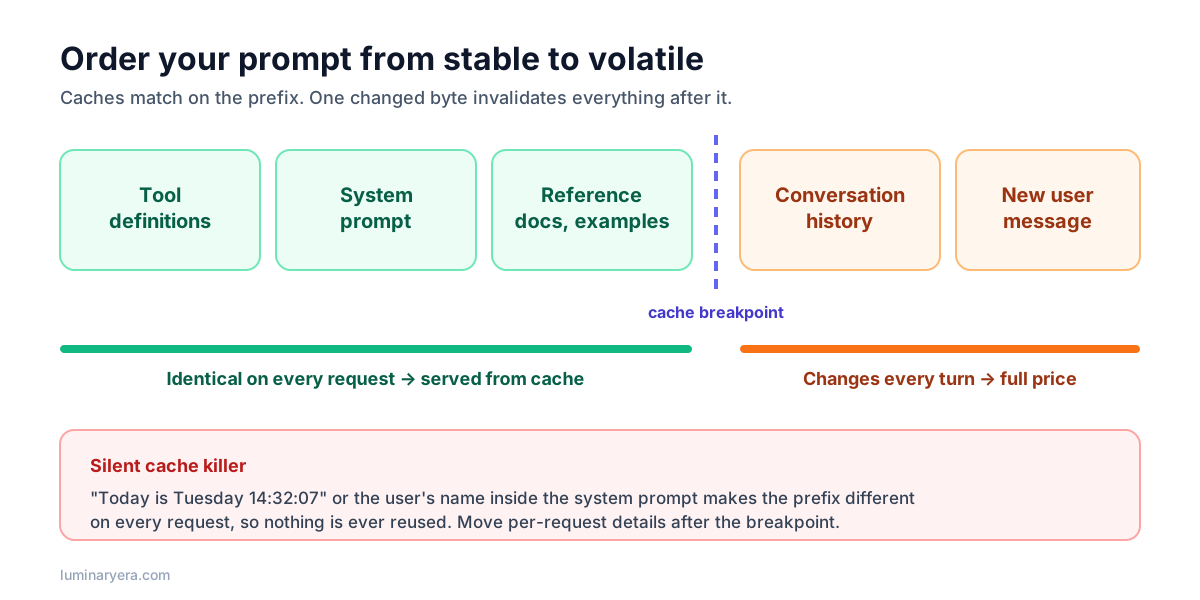
The rule is simple: order your prompt from most stable to least stable. Tool definitions and the system prompt first, then reference material that rarely changes, then the conversation, then the new message. Then hunt down the silent cache killers:
- Timestamps in the system prompt. "The current time is 14:32:07" makes every request unique. If the model needs the date, put it in the latest user message, or round it to the day.
- Per-user details at the top. The user's name, plan, or preferences in the system prompt split the cache by user. Move them after the stable part.
- Non-deterministic serialization. Tool definitions built from an unordered map, or JSON with keys in varying order, produce a different prefix on each request even though nothing meaningful changed.
- Changing the tool list per request. Adding or removing a tool near the start of the prompt invalidates everything after it. Prefer a stable tool set.
- Switching models. Caches are per model. Routing between models, which we'll discuss below, means each model keeps its own cache.
Then verify. Responses report how many input tokens were served from cache. If that number is zero on the second identical request, something in your prefix is changing. I'd put a cache hit rate metric on your dashboard next to cost; it's the earliest warning that someone has accidentally broken caching with an innocent-looking change.
Lever 2: send less
After caching, look at what you're sending that you don't need.
Retrieval. Many RAG systems send ten or twenty chunks "to be safe". If your retrieval is good, three to five well-ranked chunks usually work as well or better, because models don't use long, noisy context evenly. Improving retrieval quality, for instance with reranking, often lets you send fewer chunks and get better answers at the same time. The guide on why RAG chatbots give bad answers covers how to measure this so you're not guessing.
Tool results. An agent that calls a search API and gets back 50 results with full metadata pays for every one of those tokens on every later step. Trim tool outputs to what the model needs: titles and IDs instead of full records, the first page instead of everything, a summary instead of raw logs. This is one of the biggest wins in agent workloads, and it also tends to improve the agent's decisions, because there's less noise to wade through. The article on designing tools for AI agents goes into this in detail.
Conversation history. Long chats don't need every turn verbatim forever. Options include keeping the last N turns plus a running summary of earlier ones, dropping old tool results once they've been used, or using your provider's context management features if available. Be careful here: summarizing history changes the prefix and can break caching, so measure the net effect.
Unused instructions. System prompts accumulate. Every incident adds a paragraph and nobody removes anything. Once a quarter, read your system prompt and ask whether each part is still needed. Your evals will tell you whether removing it changes anything.
Whole documents. If a feature sends a full 40-page PDF to answer a question about one section, consider extracting the relevant section first, or using retrieval over the document.
Lever 3: get back less
Output tokens are the most expensive kind, so it's worth making sure you only pay for output you use.
- Set
max_tokensper feature. A classification call needs a few tokens. A summary needs a few hundred. Don't use one generous global limit everywhere. Do leave enough headroom that legitimate responses aren't cut off, because a truncated response that needs a retry costs more than a slightly higher limit. - Ask for the format you need. If your code only reads a category and a confidence, use a structured output instead of asking for an explanation you'll throw away. The guide to reliable JSON from LLMs shows how.
- Be explicit about length. "Answer in two or three sentences" works, and it's often what users wanted anyway.
- Tune reasoning effort per route. Many current models let you control how much they think before answering. Hard analytical tasks benefit from more; simple lookups, classification, and chit-chat usually don't. Measure on your own tasks rather than leaving one default for every feature.
Lever 4: batch what can wait
Not every LLM call needs an answer in two seconds. Nightly report generation, backfilling summaries for old documents, classifying last week's tickets, running your evaluation suite: none of these have a user waiting.
Most major providers offer a batch API for exactly this. You submit a file or list of requests, and results come back asynchronously at a significant discount. Anthropic's Message Batches API, for example, charges 50% of standard prices, with most batches finishing within an hour and a maximum processing window of 24 hours. The batch discount also stacks with prompt caching. OpenAI's Batch API offers a similar discount for asynchronous work.
The trick is to look for work that's currently synchronous only out of habit. If a job runs from a cron schedule or a queue, it's probably a batch candidate. Just keep anything user-facing synchronous; the 24-hour window is a maximum, not a promise of speed.
Lever 5: route requests to the right model
Now we get to the trade-offs. Not every request needs your most capable model. Classifying a ticket into one of five categories, extracting an email address, or detecting the language of a message are tasks small, cheap models handle well. Routing those to a smaller model can cut their cost dramatically.
A few ways to do it, from simplest to most complex:
- Route by feature. Each feature uses the cheapest model that passes its evals. Triage uses a small model; the complex assistant uses a large one. This is simple, predictable, and gets most of the benefit.
- Route by task type within a feature. A cheap classifier decides whether a request is simple or complex, and sends it to the matching model. This adds a call and a failure mode (misrouting), so measure whether the savings are real.
- Cascade. Try the small model first; if the output fails validation or a confidence check, escalate to the large model. This works well when you have a reliable automatic check, such as schema validation or test execution.
Before you build any of this, test one simpler alternative: the more capable model with lower reasoning effort. Newer models at lower effort often match older or smaller models at higher effort, and a single model keeps a single cache, which matters given everything in lever 1. Judge by cost per completed task on your eval set, not by the price list.
Lever 6: cache answers, carefully
Prompt caching reuses the processing of your input. Response caching goes further and reuses whole answers. For truly identical requests, such as the same FAQ question with the same context or the same document summarized twice, an exact-match cache in your own application is simple and safe. Key it on a hash of the full request, including model and parameters, and set a sensible expiry.
Semantic caching, where you return a stored answer for a question that's merely similar to a previous one, is much riskier. "How do I cancel my subscription?" and "How do I cancel my subscription renewal?" may need different answers. If you try it, use a strict similarity threshold, scope it to content that's genuinely shared across users, and evaluate it as carefully as any other change. A wrong cached answer is worse than an expensive right one.
Lever 7: protect the budget
Some spend isn't inefficiency at all; it's abuse. Public chat features attract scripts that use your app as a free LLM proxy, and agents can get stuck in loops that call tools hundreds of times.
- Set per-user and per-feature rate limits and daily token quotas.
- Cap the number of steps an agent can take per task, and the number of tokens it can spend.
- Alert on unusual spikes per feature, not just on the monthly total.
- Require sign-in for expensive features if you can.
An illustrative example
To make this concrete, here's a simplified, hypothetical support chatbot. The prices and volumes are made-up round numbers for illustration, not any provider's real pricing: $3 per million input tokens, $15 per million output tokens, 100,000 conversations a month, six turns each.
Each turn sends about 9,000 input tokens (4,000 of stable tools and instructions, 5,000 of retrieved documents and history) and gets back about 400 output tokens. Per conversation that's 54,000 input and 2,400 output tokens, or roughly $16,200 a month in input and $3,600 in output: about $19,800 total.
| Change | Effect per conversation | Approximate monthly cost |
|---|---|---|
| Starting point | 54,000 input, 2,400 output tokens | $19,800 |
| Cache the 4,000-token stable prefix | Static input billed as one write plus five cheap reads instead of six full-price sends | about $14,700 |
| Send 3 well-ranked chunks instead of 5 | Dynamic input per turn falls from about 5,000 to 3,800 tokens | about $12,500 |
| Ask for shorter answers | Average output falls from 400 to 300 tokens per turn | about $11,600 |
That's a reduction of roughly 40% without changing the model. The caching row assumes a user's turns arrive within the five-minute cache window, which is typical for live chat. The estimate is also conservative, because it only caches the static prefix. In real systems, caching the growing conversation history as well often saves considerably more. Your numbers will differ, but the shape is typical: the free wins come first, and they're large.
Don't optimize blind
Every lever above can quietly hurt quality if you're careless. Fewer retrieved chunks can drop the one that mattered. A smaller model can be fine on 95% of requests and terrible on the 5% that matter most. A shorter answer can omit the step users needed.
So treat cost changes like any other change: run your evals before and after, and compare cost per completed task, not cost per request. If you don't have evals yet, the guide on how to test LLM features walks through building a small, useful suite in about a week. It's the difference between saving 40% and saving 40% while slowly losing customers.
Cost optimization checklist
- ☐ Token usage is logged per request with feature, model, and task ID
- ☐ Cost per completed task is tracked per feature
- ☐ Prompts are ordered from stable to volatile; prompt caching is enabled
- ☐ No timestamps, user details, or unordered data in the cached prefix
- ☐ Cache hit rate is monitored
- ☐ Retrieved context and tool outputs are trimmed to what the model needs
- ☐
max_tokensand reasoning effort are set per feature - ☐ Non-urgent workloads use a batch API
- ☐ Each feature uses the cheapest model that passes its evals
- ☐ Per-user quotas, agent step limits, and spend alerts are in place
- ☐ Every cost change is checked against an eval before shipping
Frequently asked questions
Why is my LLM API bill so high?
Usually because of input tokens that are resent on every request: system prompts, tool definitions, retrieved documents, and conversation history that grows with every turn. Agents add accumulated tool results on every step. Logging usage per feature typically shows that one or two features account for most of the cost.
How much does prompt caching save?
It depends on how much of each request is a stable, repeated prefix and on your provider's pricing. With Anthropic's caching, for example, cached reads cost about a tenth of the normal input price, while writing to the cache costs a premium, so savings on the cached portion approach 90% when the same prefix is reused often. Overall savings depend on what share of your input is cacheable.
Is it cheaper to use a smaller model?
Per token, yes, but not always per completed task. A smaller model that needs more retries, more agent steps, or more human corrections can end up costing more. Compare models on your own evals using cost per successfully completed task, and also test the larger model at lower reasoning effort.
What is a batch API and when should I use it?
A batch API processes many requests asynchronously at a discount, commonly around 50%, with results returned within a set window such as 24 hours. Use it for work no user is waiting on, such as nightly jobs, backfills, bulk classification, and evaluation runs.
Do output tokens cost more than input tokens?
Yes, typically several times more per token. However, applications usually send far more input tokens than they receive in output, because context is resent on each request, so input often makes up most of the total bill.
The takeaway
The fastest way to cut an LLM bill isn't a cheaper model. It's noticing that you pay full price, over and over, to send the model the same thousands of tokens it has already seen. Measure per feature, fix your prompt layout so caching works, stop sending context the model doesn't need, and move patient work to batch. Then, with evals as your safety net, look at model routing.
Most teams that do this find that the scary invoice was mostly paying for repetition. Remove the repetition and the product stays exactly as good, just a lot cheaper to run.
Author at LuminaryEra
The LuminaryEra editorial desk publishes long-form, hands-on guides on AI-assisted development, large language models, developer tools and web engineering. Articles are researched and drafted with the help of AI tools, link to their sources, and are corrected when readers report errors.
View all articles